Classified Ads Software
Classifieds sites and marketplaces are often taken for the same thing, but they set up different contracts. On a classifieds site the platform makes the introduction and the transaction is usually completed elsewhere. That changes what you measure, your revenue model and the lifespan of your content.
- Listings are time-limited; expired ones drop automatically
- Listing durationListings are time-limited; expired ones drop automatically
- A quota- and package-based publishing model
- Listing allowancesA quota- and package-based publishing model
- Featuring is the main revenue line
- PromotionsFeaturing is the main revenue line
- Conversion is measured in contacts, not orders
- EnquiriesConversion is measured in contacts, not orders
What Does the Listing Model Do Differently?
Classified ads software and marketplace software are often taken for the same thing, but they set up two different contracts. On a marketplace the platform is a party to the transaction: payment flows through it, shipping comes out of the system, and you intervene in disputes. On a classifieds site the platform only makes the introduction; the transaction itself is usually completed elsewhere, face to face or over the phone.
That difference changes what the system measures. On a marketplace success is order count; on a classifieds site it is views and enquiries per listing. The seller buys a promotion package because they can see their phone ringing. So the listing performance screen is not a reporting detail but a product that generates revenue directly.
The third decisive matter is that a listing has a lifespan. A product catalogue is permanent, but a listing is published, stays visible for a set period, and then drops. The person who sells usually forgets to take it down, which is why duration management, expiry warnings and a renewal flow are the only thing protecting catalogue quality. A site that publishes listings with no expiry goes stale quickly and loses users' trust.
The four things that shape the listing model
Listings expire
They drop automatically when the period ends; listings with no expiry make the catalogue stale.
Conversion = contact
Calls, messages and offers are measured rather than orders.
Revenue comes from publishing
Not commission but listing fees, quota packages and promotion sales.
Moderation is a scale problem
At high listing volumes manual approval is not enough; rule-based filtering is needed.
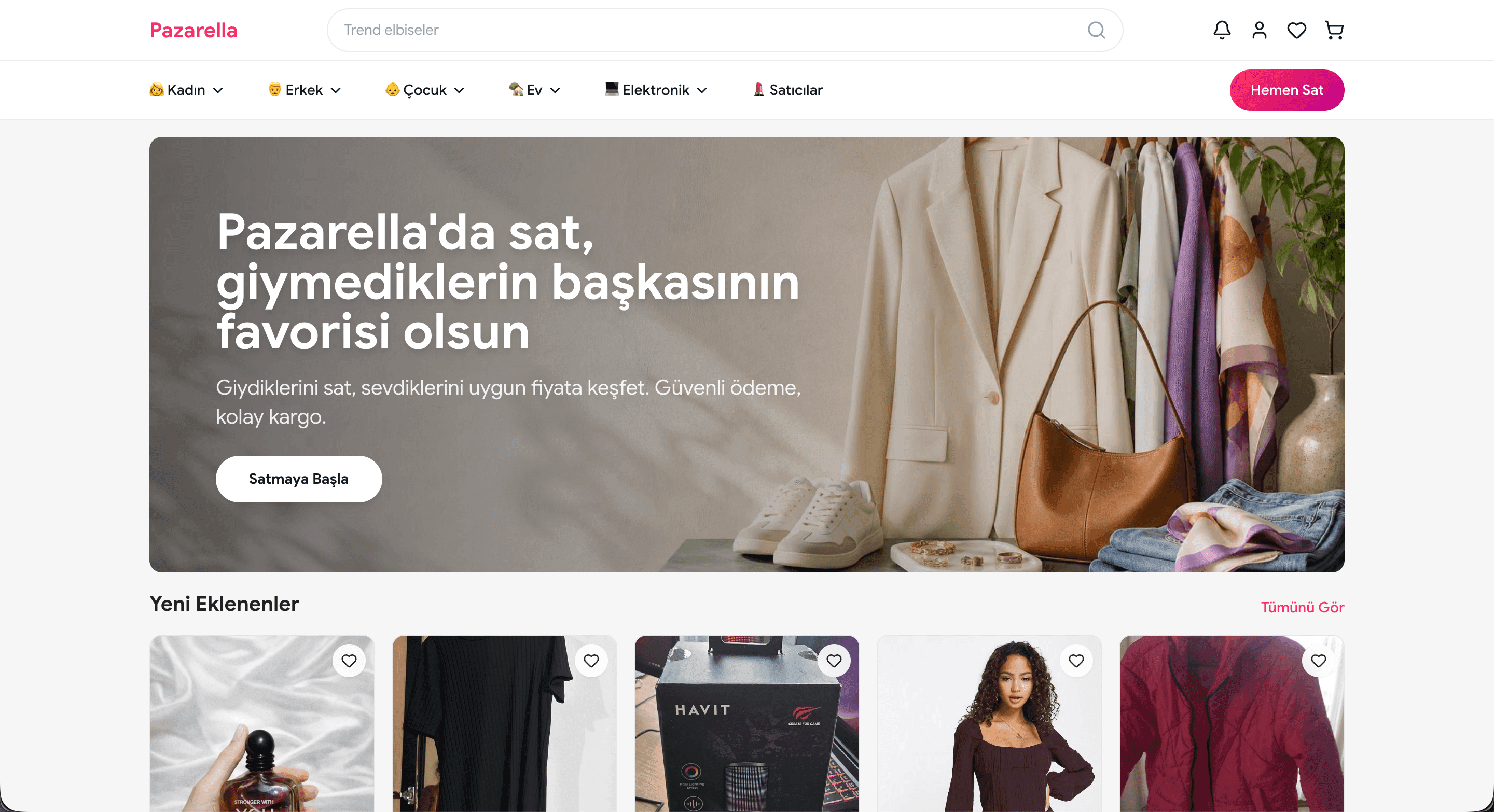
Pazarella: A Listing Platform Live on This Infrastructure
Pazarella.com is a C2C listing platform where users publish their second-hand items as listings and trade directly with each other. It was built on PazaryeriSoft and is a live example of the listing model described on this page.
- Listings across women, men, kids, home and electronics categories
- Fast listing creation with the "Sell Now" call to action on every page
- A newly added listings feed and seller storefronts
- Favorites and seller follows
The Path a Listing Takes From Creation to the Archive
What protects catalogue quality is the last three steps of this cycle: the reminder, the renewal and the automatic expiry.
The listing is created
When a category is chosen, that category's field template opens. If the user has a listing allowance they continue straight on; if not, they are sent to the package purchase step.
It passes through moderation
Depending on your rule set the listing is published directly or lands with an editor. Prohibited category, duplicate record and suspicious price checks run at this step; on a rejected listing the reason is passed back to the user.
It goes live and is tracked
The owner follows views, favourites and enquiries in their own panel. This screen is where the decision to buy a promotion package is made.
A promotion can be bought
Packages such as showcase listings, bump-to-top, a coloured frame and an urgent badge are purchased. Each has a duration, and when it ends the listing returns to its normal position.
Expiry approaches
A reminder goes to the owner a set number of days before the end. If automatic renewal is on, a listing allowance is deducted and the period is extended.
It renews, sells or drops
The listing is renewed, marked as sold, or comes off the site when the period ends. A dropped listing is kept in the archive and can be republished by its owner in one click.
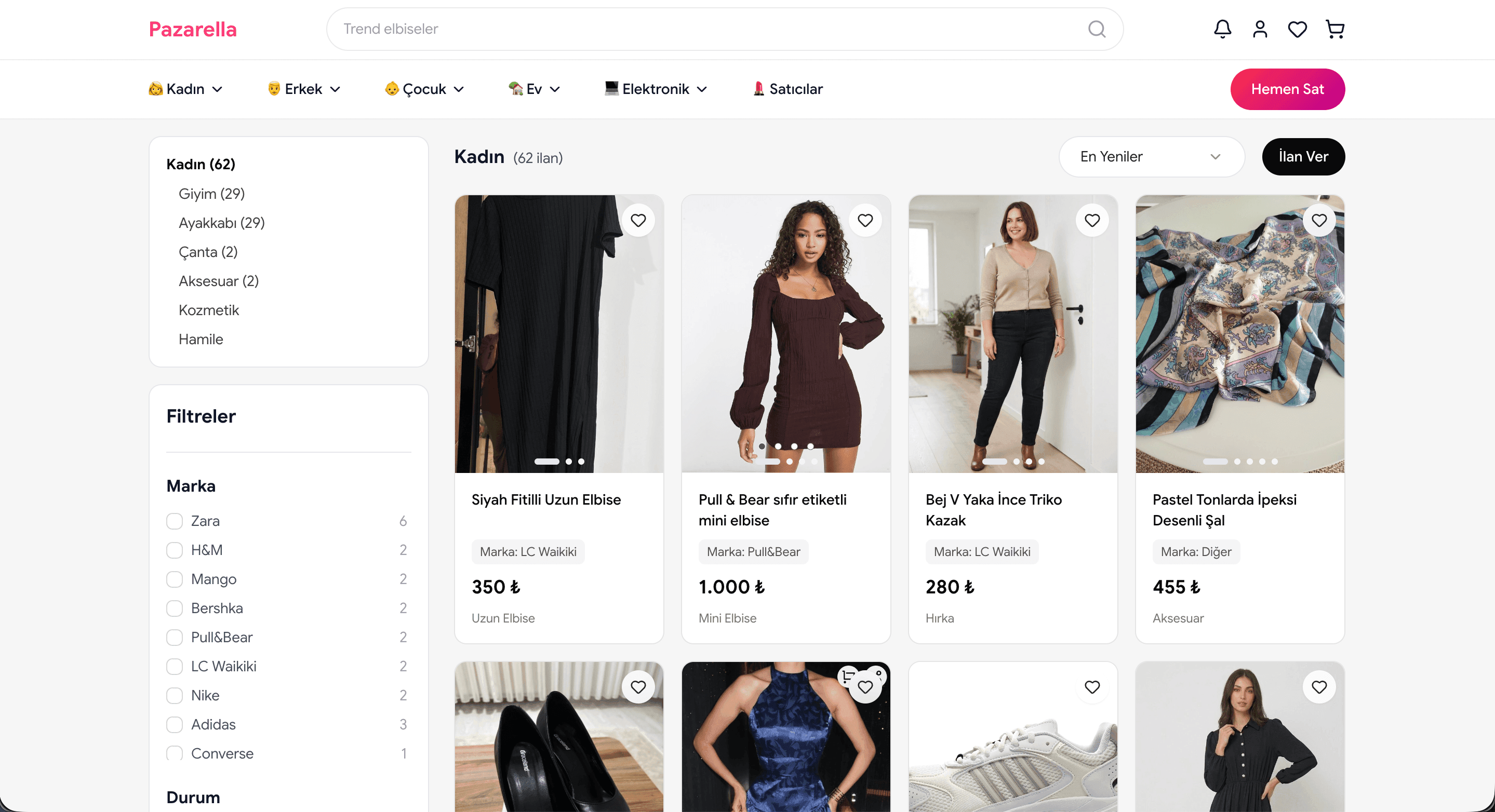
Listing Discovery with Categories and Filters
On a listing site, visitors find what they need through filters. On Pazarella every category shows its own subcategories and listing counts, and filters are generated from category-specific attributes.
- Brand, size and condition filters
- Live listing counts in subcategories
- Newest and most popular sorting
- One-click favorites right from the card
Modules That Come Ready on a Listing Platform
Listing Duration and Automatic Expiry
Different durations are defined per category; when the period ends the listing drops automatically and moves to the archive.
Listing Allowances and Quota Management
Free listing allowances by user type, package-based quotas and buying extra listings. When the quota runs out, the flow leads to the package screen.
Promotion and Featuring Packages
Showcase, bump-to-top, coloured frame and badge packages. They run for a set time, after which the listing returns to its normal position.
Category-Specific Field Templates
Every category asks its own fields; the data collected turns directly into filters on the search side.
Listing Performance Screen
Views, favourites, phone reveals and message counts. This screen is the strongest trigger for promotion sales.
Messaging and Phone Reveals
In-platform conversation and controlled phone number reveals. The reveal count is recorded and written into the performance report.
Location and Map Search
City, district or radius selection on the map. In the listing model, distance is one of the most used filters.
Saved Searches and Alerts
The user saves their criteria and is alerted when a matching new listing goes live. It is the main source of return traffic.
Moderation at Scale
Rule-based automatic filtering, duplicate detection, user reporting and automatic suspension on repeat violations.
Prohibited Content Rule Set
Category and content rules are defined; records outside the scope are never published and the user is told why.
Bulk Listing Upload
Business accounts transfer their portfolios via XML or Excel and keep them current with scheduled synchronisation.
Business Account Packages
Subscription packages containing listing allowances and promotion credits for dealer, office or company accounts.
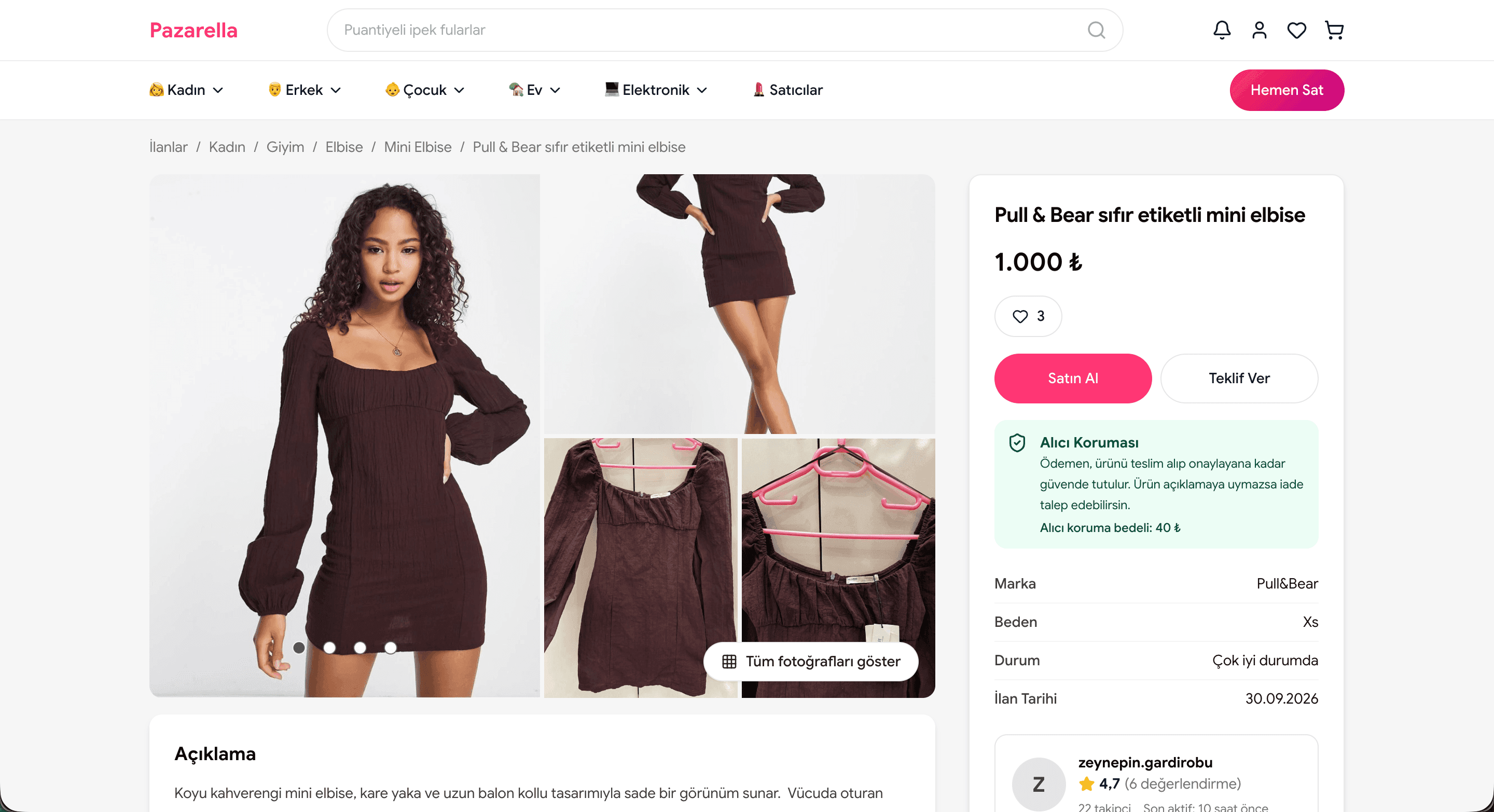
Buy or Make an Offer on the Listing Page
The listing detail page is where conversion happens. On Pazarella visitors can buy the item directly or send the seller an offer, with trust signals on the same screen.
- Buy and Make an Offer buttons side by side
- Buyer Protection box and protection fee
- Brand, size, condition and listing date
- Seller rating, reviews and follower count
Classifieds Site and Marketplace Compared
It is also possible to run both on the same platform, split by category.
| Criterion | Classifieds site | Marketplace |
|---|---|---|
| The platform's role | Makes the introduction | Is a party to the transaction |
| Payment | Usually off the platform | Through the platform, split |
| Delivery | Hand delivery or between the parties | Shipping and tracking from the system |
| Revenue model | Listing fees, quota packages, promotions | Commission, transaction fees, subscriptions |
| Measure of success | Views and enquiries per listing | Orders and transaction volume |
| Content lifespan | Time-limited; expired listings drop | A permanent catalogue |
| Disputes | The platform intervenes in a limited way | The platform resolves it; it holds the money |
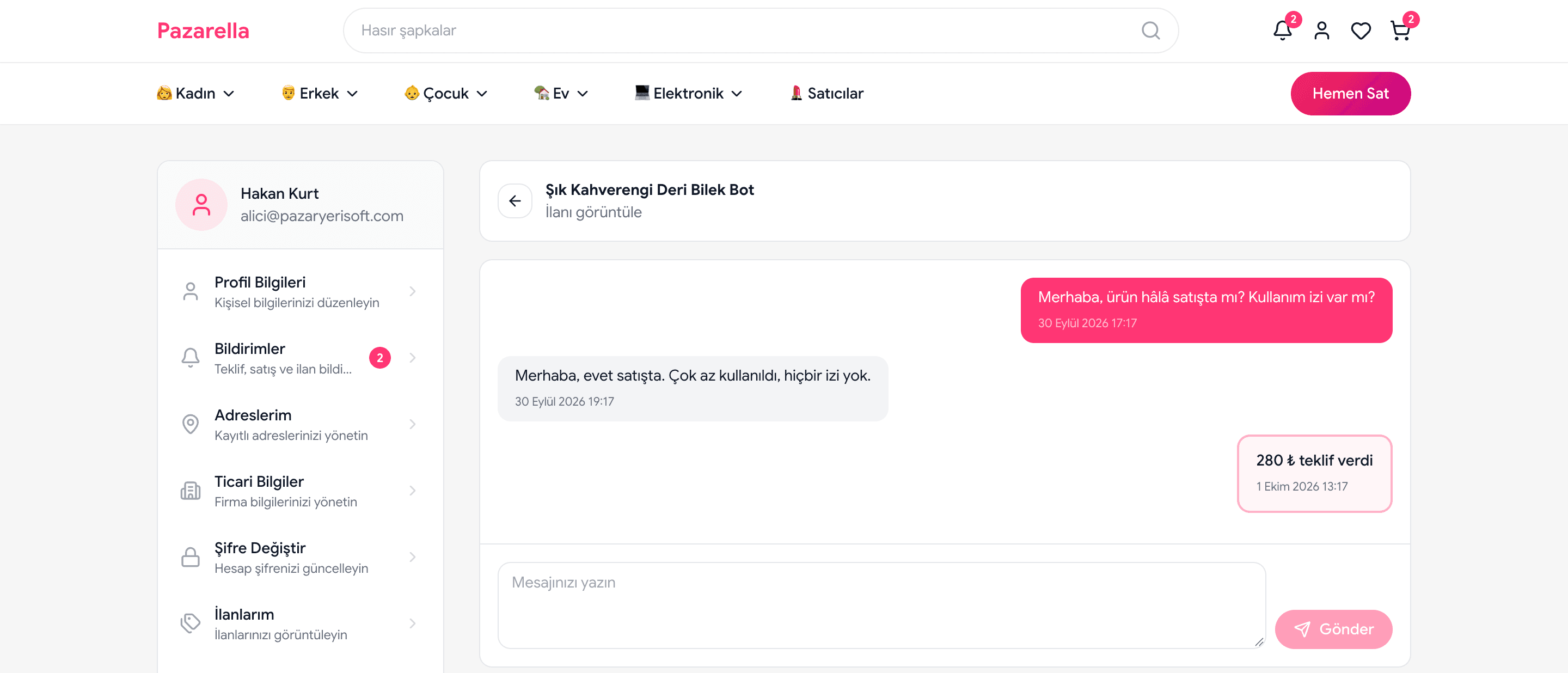
Secure Messaging on the Listing
In the listing model, communication is the sale itself. On Pazarella buyers and sellers chat on the listing — no need to share phone numbers or emails, and negotiation continues in the same conversation.
- Every conversation is tied to its listing
- Offers appear as cards in the conversation
- Phone numbers, emails and IBANs are masked automatically
- Block unwanted users
The Four Areas Where the Listing Model Works
Every vertical wants its own field template and its own revenue balance.
Vehicle Listings
The busiest listing vertical, working with make, model, year and mileage templates; dealer accounts and the promotion economy are mature here.
Automotive classifieds softwareProperty Listings
A vertical requiring location-based search, an office-and-agent hierarchy and bulk portfolio transfer.
Real estate listing softwareService and Job Listings
The model where the request-and-quote flow comes to the fore; the request form and provider profile take the centre in place of a listing.
Service marketplace softwareSecond-Hand Goods Listings
A low-value, high-volume category. Here the listing model usually turns into a marketplace flow: payment and shipping are brought inside.
Second-hand marketplace software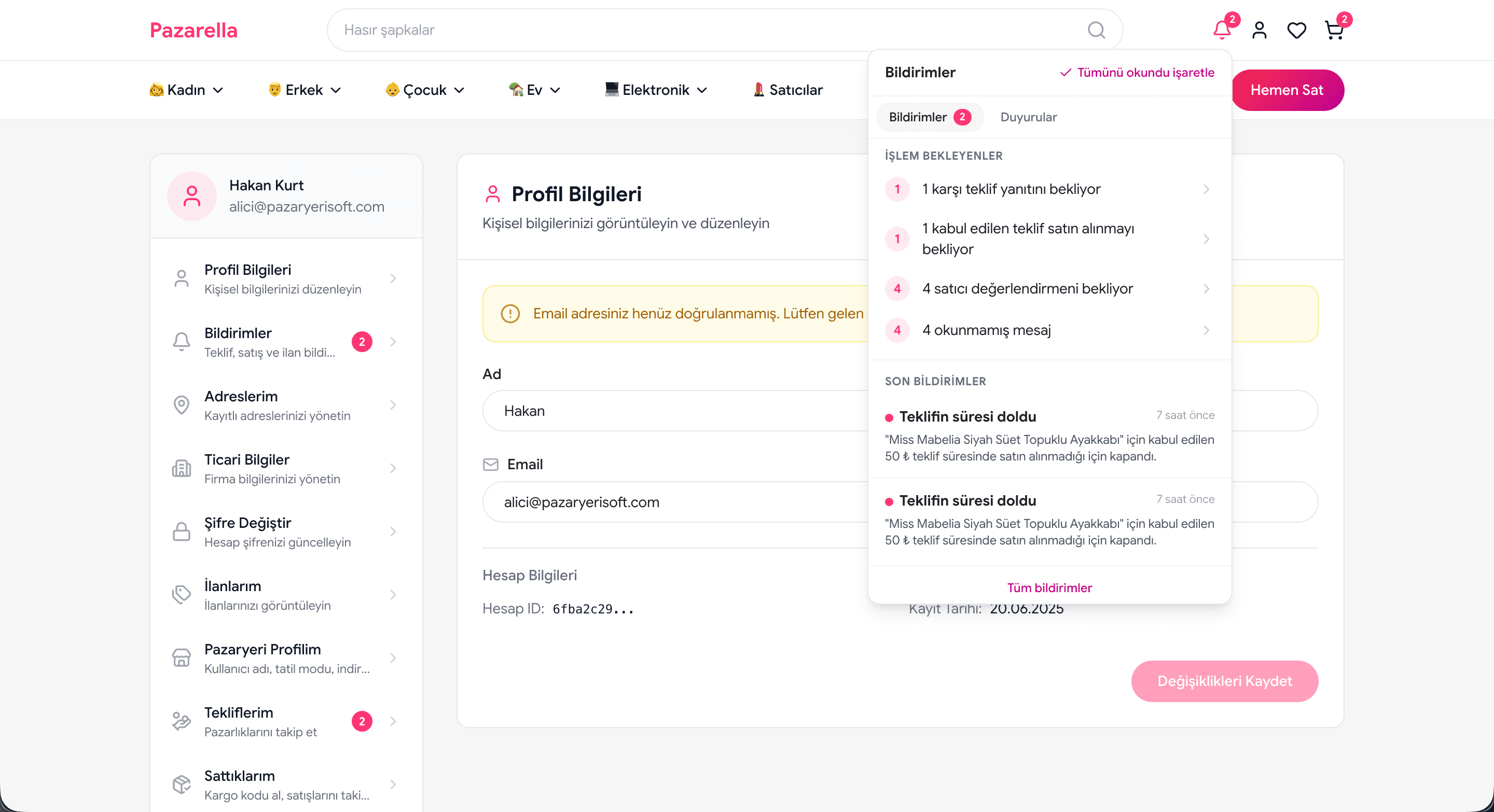
A Notification Center That Never Misses a Pending Action
An unanswered offer or an unread message is a lost sale. Pazarella's notification bell shows the actions users need to take at the top, with counters.
- Counter offers and offers awaiting purchase
- Purchases awaiting a review
- Unread message counter
- Announcements and email notification preferences
Frequently Asked Questions
Questions asked often by teams planning to build a listing platform.
Related Pages
C2C Marketplace Software
What changes when you move from the listing model to the marketplace model.
Automotive Classifieds Software
Field templates and dealer accounts specific to the vehicle vertical.
Real Estate Listing Software
Location-based search and office-and-agent portfolio management.
Marketplace Commission System
Where listing fees, quota packages and promotion revenue are defined.
Start Building Your Listing Platform
Let's plan your category structure, your listing duration rules and your promotion packages together.
Setup support · Web + iOS + Android · 24/7 support